UC Hospitality Setup and Administration
Table of Contents
Prerequisite: UC Hospitality Setup and Administration The Hotel Page Permissions Cleaning Codes Dial Plan Drop-in Messages Web Console Wake-up Call Timeframe PMS (Property Management System) Setup Serial Logs Call Accounting Call Center Features Hosted Voice Benefits Lower startup costs and monthly savings Work smarter with advanced features. UC Hospitality Capabilities
Prerequisite:
UC Hospitality needs to be enabled. Please contact your representative for a quotation. Discover how UC Hospitality is redefining the guest experience through innovative concepts and personalized service.
Access to the UC Hospitality Portal with a scope of Reseller.
UC Hospitality Setup and Administration
UC Hospitality is a robust cloud-based UCaaS solution designed specifically for the hospitality industry. Our solution provides hotels and resorts with a comprehensive suite of communication tools that enable them to communicate more effectively with guests and staff, while also managing their operations more efficiently. Our easy deployment, management, and scalability enable streamlined communication with guests and staff, enhancing the guest experience and overall operations.
UC Hospitality can seamlessly integrate with many existing property management systems, streamlining workflows and reducing the risk of errors. Our enhanced unified communication capabilities include voice, SMS messaging, video conferencing, and more, enabling hospitality industry clients to communicate easily with guests, colleagues, and vendors. This multi-tenant, single-pane-of-glass interface provides a centralized platform for managing communication services, simplifying management.
The solution has powerful call center capabilities that efficiently manage high call volumes. Reporting tools offer valuable insights into call traffic, volume, and wait times, enabling data-driven decisions that optimize operations and enhance the guest experience. UC Hospitality is fully managed, eliminating the need for infrastructure expertise. We offer a Centralized platform, software updates, and rolling upgrades to ensure zero downtime, so you always have the latest features and improvements. No more forklift upgrades and the associated downtime and learning curves.
The Administrative and Front Desk GUI, including Hotel Self-Management, provides a user-friendly interface that simplifies the management of hotel communication services. This feature lets you easily manage your communication services, monitor usage, and troubleshoot issues. The screenshots below illustrate specific functionality in the hospitality industry.
The Hotel Page
The Hotel page controls many system-wide defaults, as well as those for the Serial Box when it is in use. Tabs include:
Permissions
Set guest calling permissions and specify the permissions staff can grant them.

Cleaning Codes
Set the cleaning code numbers, description, and defaults upon check-in/check-out. This is required.
When a guest checks out, the housekeeping staff will use the phone in the guest room to notify the property management system that the room is clean and ready for new guests. These codes, sometimes called status codes, can be defined here so they are reflected correctly in the Browser Console.
The hotel must set a label for each cleaning code it wants. If these are not set, the system will say that room status codes are unavailable when *2 is dialled.
There are no universal defaults for cleaning codes, which will often differ even among hotels with the same PMS system. A best practice is to work with the housekeeping staff to determine the codes. The Template option enables you to create a template of these settings to apply to future sites you install.

Dial Plan
Add extension translations for things like the operator call group. This is used when analog phones have hard-coded speed dial buttons that do not dial 0 or other common extensions.

This page enables creating additional extensions for any existing extension. It is most commonly used to create extensions for the operator call group based on the hard-coded speed dials of analog phones.

Examples: guest room phones dial *50 for the operator

Add / Edit

This is the number dialled by the analog phone or extra extension that needs to exist.

The location where the call will be routed when the Dialled Number is called.

These optional notes enable the tracking of why a dial plan was created and which phones it supports.
Drop-in Messages
Here, messages can be set up that staff can easily drop into a guest's voicemail box. These messages are an optional way for hotel staff to communicate with guests. If hotel staff frequently leave the same message for guests, drop-in messages should be considered a way to reduce staff labour and ensure a high-quality message every time. These are pre-canned voicemail messages that hotel staff can quickly set to drop into guests' voicemail boxes. For example, "You have a package waiting for you at the front desk."


Set up TTS Voice
This button lets you select a voice for all text-to-speech drop-in messages.


Add Drop-in Message
A simple name for the message. This name is presented to the hotel staff, so it should be easy to understand.

Set Message
Clicking this button lets you create a new message using text-to-speech or upload one from local storage (i.e., your computer).
Always play any text-to-speech messages to ensure correct pronunciation and timing.

Deleting Drop-in Messages
Clicking the Clear button will delete the text-to-speech message.

Web Console

This controls who has access to the UC Hospitality Browser Console and who does not, as well as the options provided to hotel staff.
|
Show Checkin: Should the browser console allow users to check in/out guests? |
 |
|
Show Move Room: Should the browser console allow users to move a guest to another Room? |
 |
|
Show Room Status: Should the browser console display room status? |
 |
|
Show Call Billing: Should the browser console display guest call billing data and reports? |
 |
|
Restrict Login by IP: This is a whitelist, not a black list of IP addresses. Thus, if you enter the IP 1.2.3.4, only people accessing the browser console from 1.2.3.4 will be allowed to log in; all others will be blocked. Because the UC Hospitality Browser Console uses a shared URL for all hotels, a user from an IP not on the whitelist will see the login screen but will be blocked from logging in. |
 |
|
Users Excluded From IP Restriction: Any users listed here will be allowed to log in from any IP address, even if the above restriction applies. You can enable the login feature. |
 |
|
Localization: You can set the language and other localized settings. |

|
Wake-up Call
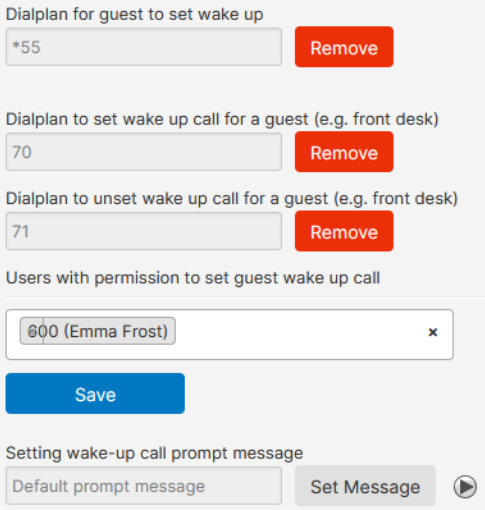
This allows guests and staff to set up wake-up calls. Here, extensions for guest and admin wake-up call setups can be defined, along with the users who are permitted to set them up.

Add / Edit Wakeup Calls
|
Dial plan for Guest to set Wake-up: Sets the extension that guests can dial to set up wakeup calls.set upset up |
 |
| Dial plan to Set Wake-up Call for a Guest (e.g. Front Desk): Sets the extension that staff can dial to set up Wake-up Calls. |  |
| Users with Permission to Set Guest Wake-up Call: Hotel staff must have permission to set up wake-up calls via phone. To grant that permission, a wake-up call will be attempted multiple times before being considered a failure, and the time between attempts is listed here for the users. |  |
|
Wake-up Call Prompt Message: Set default prompt message. |

|
| Number of Retries, Retry Interval, and Missed Wake-up Call Notification Method: These settings control how many wake-up call attempts are made before it is considered a failure and the time between attempts. There is also a location to send a notification should a wake-up call be missed. |

|
Timeframe

The feature is being redesigned; more info to come.
PMS (Property Management System) Setup
If a Serial Box is used, its MAC address is added here. This page will also display if the device is online.

|
Name: The device's name, typically "Serial Box". |
 |
| MAC: Enter the MAC address of the serial box without colons. |  |
|
Site: If you are in a dual-brand situation, select the site here.
|

|

You can set up the PMS by selecting it from the drop-down menu, adding credentials, and associating the device with a unique property identifier.
Serial Logs
This page displays the Serial Box's logs for troubleshooting. It will also display the logs for any attached Serial Devices for debugging and troubleshooting. There is a date filter, but nothing to add or edit on this page.

Call Accounting
Sets billing rates on outbound calls.

|
Call Accounting: Allows setting up rate tables for outbound calls from guests. Call accounting must be enabled to work. |
 |
| Rule Options |
0-9: Any single digit x: Any dingle digit ?: Allows the preceding digit to be dialled or not (i.e. 1?xxxxxxxxxx will allow 10-digit dialling with or without the leading 1) *: Any digit, unlimited length |
|
Default Rules: Click the Default Rules button to begin the process. |
 Select from Local, International, and NANPA (North American Numbering Plan Administrator). Local: Uses the hotels main number to automatically define what is a local call from that area. This feature saves a lot of setup time and hassle. Adding the default Local rules will add several hundred rules. International: Basic 011 rule Long Distance: Basic 1?xxxxxxxxxx rule |
Call Center Features
|
Reporting - Queue Stats
Review queue performance
|
 |
-
Agents: Equip your call center with skilled agents who can efficiently handle customer inquiries and provide excellent service.
-
Attended Console: With our intuitive attended console, supervisors can gain complete control over call management and seamlessly monitor and assist agents.
-
Call Announcement: Keep your team informed with announcements to ensure smooth call transfers and minimize customer wait times.
-
Call Dispositions: Easily categorize and track call outcomes with our call disposition feature, enabling you to analyze and improve customer interactions.
-
Monitor, Whisper, and Barge: Real-time monitoring, whispering, and barging functionalities enhance agent performance and training.
-
Queue Call Back: Offer your callers the convenience of a callback option to reduce wait times and improve customer satisfaction.
-
Real-Time Wall Boards: Monitor call center performance at a glance with wall boards that display key metrics and statistics.
-
Skill-Based Routing: To optimize customer service levels and ensure calls are directed to the most suitable agents based on their skills and expertise.
- Time of Day and Day of the Week Reporting: Comprehensive reporting based on specific timeframes provides valuable insights into call patterns and trends.
-
Call Queues: Efficiently manage incoming calls with unlimited call queues, ensuring every customer is promptly attended to.
-
Wait Time Announcement: Keep your callers informed about estimated wait times to reduce frustration and enhance their experience.
Hosted Voice Benefits
Lower startup costs and monthly savings
There is no need to purchase or lease PBX or phone system equipment, no maintenance contracts, and no fees for account changes. All you need are IP phones and a voice gateway.
Work smarter with advanced features.
Flexible features save time and improve communication with customers and
colleagues. Easy-to-use features include web management for all options and features for easy administration, visual voicemail, find-me/follow-me, and more, listed below.
- One flat rate monthly bill.
- UC Hospitality includes unlimited nationwide long-distance calling to manage all the options.
- Our SIP trunk offering eliminates the surprise of fluctuating long-distance bills, and the monthly bill is typically much lower than most carriers.
UC Hospitality Capabilities
|
Web Management Portal The web management portal allows you to manage all the options and features of your business phone system. Some features include voicemail, complete call history, call-forward management, and the ability to forward incoming calls to multiple destinations. 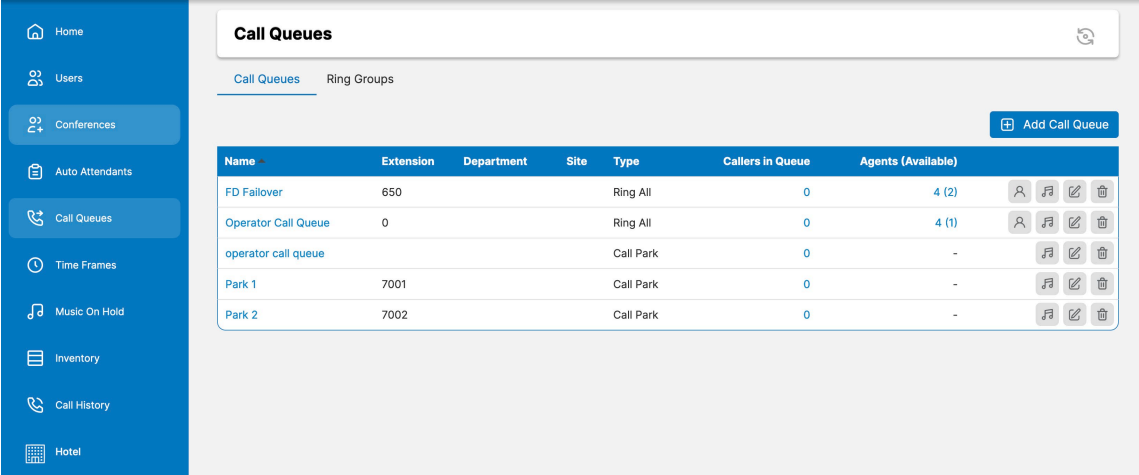 |
Advanced Call Routing Advanced call routing lets you forward incoming calls to multiple destinations, so you can ring your cell phone, business phone, or even your home phone.
|
|
Auto Attendant 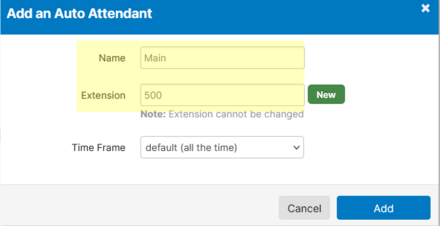 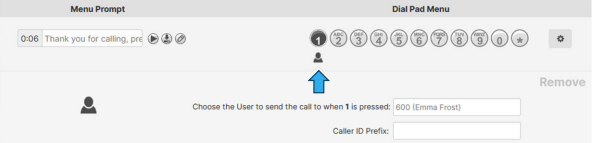 |
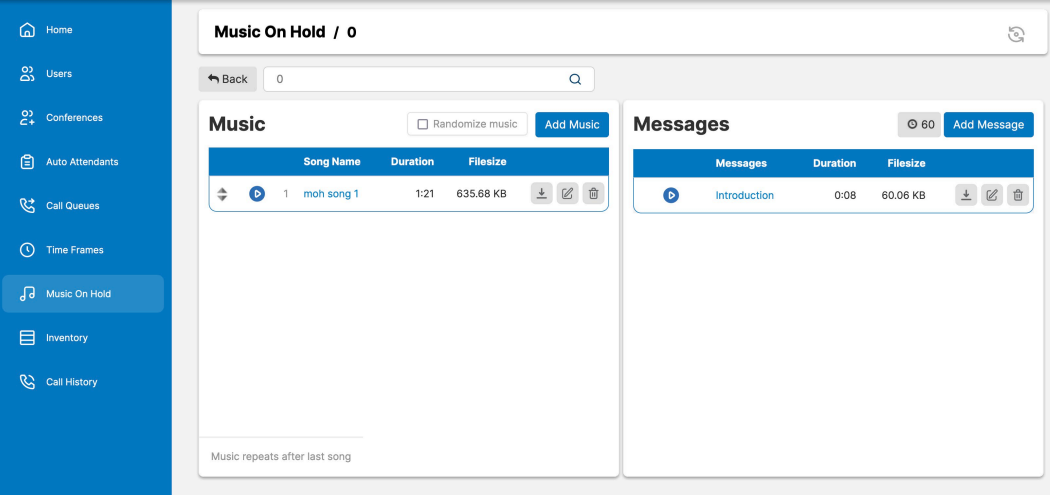
Music and Messages on Hold
|
|
Visual Voicemail (Voicemail to Email)
Voicemail Transcription: Enables or disables voicemail transcription.
Options: Send email when mailbox is full: Notifies the user via email when their inbox is full. Send email after missed call: Sends the user a notification when they miss a call, even if no voicemail is left.
|
Time-Based Call Routing and Greetings Route calls or play a custom greeting based on the time of day or holiday. 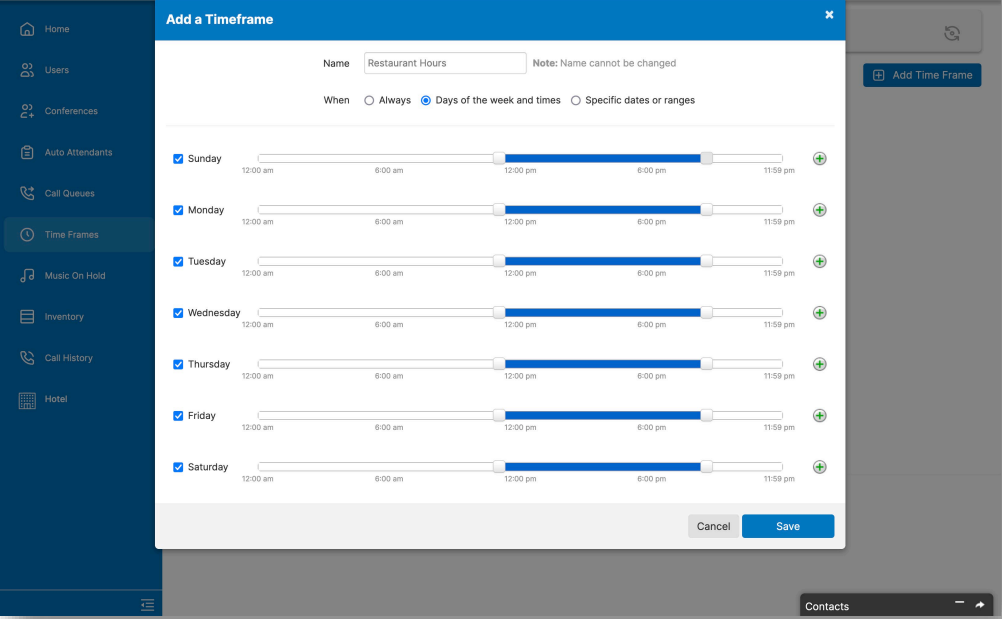 |
|
HD Voice
|
Toll-Free and Local Phone Numbers Choose a toll-free and/or a local number to ring your phone system, or we'll port your current number. Add additional numbers to give a multi-city appearance. |
|
Multi-Site Enjoy the same features and the same 3-digit dialling at each of your sites. Calling someone at another site is as easy as calling someone on your own site.
Sites are used for a dual-brand hotel setup. Users will rarely be assigned to a site, but rooms are assigned more often.  |
Mobile Integration Take full advantage of the phone system from anywhere. 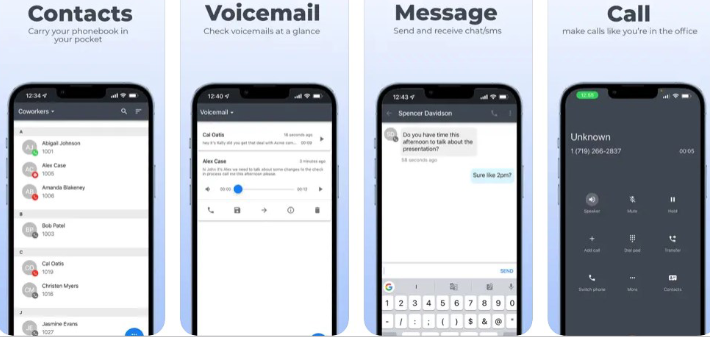 |